After upgrading to APEX 26.1, every modal dialog page opened empty
Fix Oracle APEX Tested on APEX 26.1.0universal themeupgrademodal dialogcss
After an application was upgraded to APEX 26.1, testing found that every modal dialog page opened empty. The dark title bar appeared, the close button worked, and underneath there was nothing. Not one modal page in particular: all of them, and the application had more than fifty.
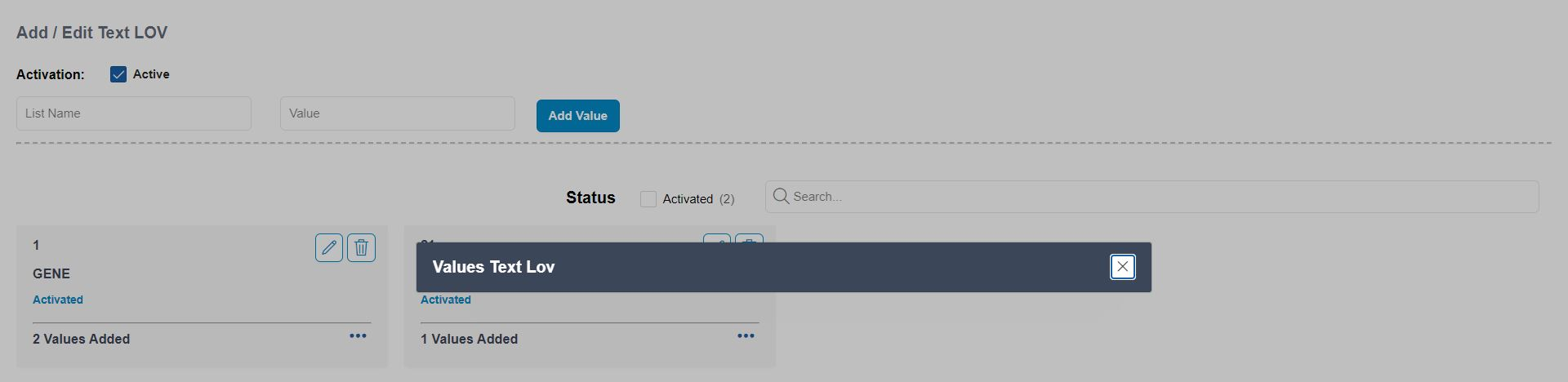
I lost hours to it, because I tried to explain it by reading things: the region queries, the page processes, the authorization schemes. Four theories, four dead ends. What ended it was one small measurement in the browser console. That measurement is the most useful part of this post, so it comes first.
Measure the dialog before you touch the page#
Open one of the broken dialogs, then run this in the browser console of the parent page (the page that opened the dialog):
var f = document.querySelector('.ui-dialog iframe');
console.log('iframe h=' + f.offsetHeight + ' w=' + f.offsetWidth);
console.log('wrapper h=' + f.parentElement.offsetHeight);
console.log('inner text chars = ' + f.contentDocument.body.innerText.length);
In my case it printed:
iframe h=0 w=706
wrapper h=0
inner text chars = 45
That output settles the question. A modal dialog page in APEX is loaded inside an <iframe>. The page did render inside the frame: there was text in its body, and a count of the card elements inside it found all twelve cards. The frame itself was zero pixels tall. So nothing was wrong with the page, the data or the security. The dialog was simply never given a height.
If your numbers look the same (height 0, content greater than 0), the rest of this post is your fix. If the inner content is also empty, your problem is on the page itself, and this post is not it.
The cause: the application still ran Universal Theme 22.1#
The dialog is sized by the theme, its templates and its JavaScript together. This application had been upgraded from older APEX releases, but its theme had never been refreshed, so it was still on Universal Theme 22.1 while the engine was 26.1. With that combination, the sizing never happened.
You can check the theme version from SQL. The version is part of the theme’s file prefix:
select file_prefix
  from apex_application_themes
 where application_id = :APP_ID;
-- #APEX_FILES#themes/theme_42/22.1/   <- the theme files the app loads

select version_no from apex_release;
-- 26.1.0                              <- the engine
One detail threw me off at first: the rest of the application looked fine. That is because the APEX 26.1 static files still ship the folders of older Universal Theme versions for backward compatibility. The 22.1 CSS and JavaScript still load, so pages look normal. The only visible breakage was the dialog sizing.
The real fix: refresh the theme (carefully)#
Shared Components → Themes → Universal Theme → Refresh Theme brings the theme up to the engine’s version.
Before you click it, know what it does. A refresh replaces the Universal Theme templates. If your application’s templates are customised and not subscribed to the master theme (mine were), those customisations are overwritten. So:
- Export the application first.
- Copy it to a spare application id and refresh the copy.
- Check your most customised pages on the copy before you refresh the real one.
This is the right fix, but it is a planned change, not a quick one. If you need the dialogs back today, use the workaround below and plan the refresh separately.
The workaround: give the dialog a height with CSS#
Until the theme is refreshed, a few lines of CSS restore the dialogs:
.ui-dialog .ui-dialog-content:has(> iframe) {
  height: auto !important;
  min-height: 420px !important;
}
.ui-dialog .ui-dialog-content > iframe {
  width: 100% !important;
  height: 100% !important;
  min-height: 420px !important;
}
Two details matter.
1. Scope it with :has(> iframe)#
My first version used plain .ui-dialog .ui-dialog-content. It fixed the modals, and it broke something else: that selector matches every jQuery UI dialog, including the ones apex.message.confirm and apex.message.alert create. The delete confirmation became a tall, empty panel with the question stranded at the top.
Confirm and alert dialogs contain text, not an iframe, so :has(> iframe) limits the rule to real modal pages. :has() works in all current browsers. If you must support one that lacks it, a fallback is .ui-dialog:not(.ui-dialog--notification) .ui-dialog-content.
2. Put it on the parent page, not in the dialog#
The .ui-dialog wrapper is built by the parent document. CSS inside the modal page’s own iframe cannot resize the frame it lives in. So the rule has to be loaded by the pages that open dialogs.
In APEX 26.1 the obvious place turned out not to exist: the Global Page (page 0) has no CSS or JavaScript sections in the Property Editor. What worked:
- Theme Roller → Custom CSS, saved with the theme style, so every page that uses the style gets it, or
- the Inline CSS of the page templates your normal pages use. Check which templates those are before you pick one, and cover all of them.
One more trap: if you plan to add the rule to an existing static CSS file, first make sure that file is actually referenced. The application had a style.css that no page, template or theme loaded. Editing it would have done nothing.
What I take from it#
- After an APEX upgrade, check the theme version, not just the engine version. An old theme can run for a long time, and then break one thing.
- When a page looks empty, measure before you theorise.
offsetHeight, a text length and an element count took thirty seconds. They answered a question that hours of reading code had not. - A CSS workaround belongs in a place you will find again. Leave a comment next to it that says it can be removed after the theme refresh.